How Long Do Brake Rotors Last: Expert Guide
How Long Do Brake Rotors Last? The Real Lifespan, Wear Factors, and When to Replace
Brake rotors are the metal discs that your brake pads clamp down on to slow and stop your vehicle. They are a friction component, working in tandem with pads and calipers to convert kinetic energy into heat. While they are built from cast iron or carbon-ceramic composites, they are not lifetime parts—they wear down with every single stop, and their lifespan is finite and highly variable.
So, how long do brake rotors last? The honest answer is that there is no single number, but a realistic range falls between 30,000 and 70,000 miles for most passenger vehicles. However, that range is heavily influenced by your driving habits, the rotor material, vehicle weight, and even the climate you drive in. This guide will break down the real-world lifespan data, the specific wear factors that accelerate rotor degradation, and the exact warning signs that tell you it is time to replace them rather than just resurface them.
Unlike generic advice you will find elsewhere, this article separates fact from marketing. We will cover the measurable differences between cheap and premium rotors, why thickness specifications matter more than visual appearance, and how to make a data-driven decision on whether to machine or replace. If you are tired of guessing or being upsold at the shop, this is the definitive breakdown you need.
What Are Brake Rotors and How Do They Differ from Pads and Drums?
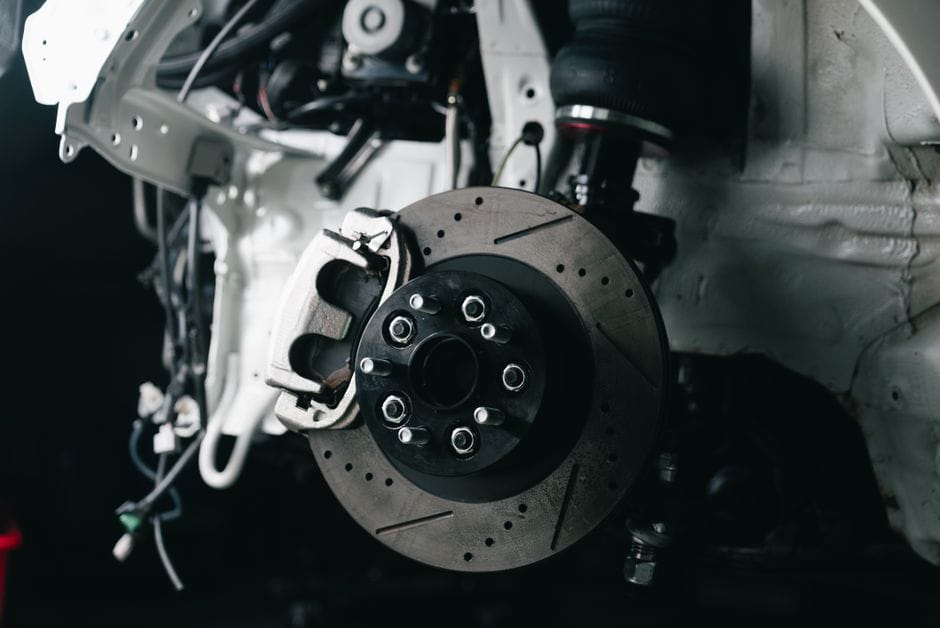
Before you can estimate how long your brake rotors will last, you need to know what they actually do. Brake rotors are the flat, metal discs that your wheel bolts onto. They spin with the wheel at the same speed. When you press the brake pedal, the brake calipers squeeze a pair of brake pads against both sides of the rotor. The friction converts your vehicle’s forward motion into heat, which slows the car down. The rotor’s job is to absorb that heat and dissipate it quickly so the braking system keeps working even after repeated stops.
The Rotor’s Role in the Braking System
Think of the rotor as the friction partner in a disc brake setup. It provides a smooth, flat surface for the pads to grip. It also acts as a heat sink. Every time you brake, the surface temperature can spike dramatically. If the rotor cannot shed that heat, it warps or cracks. The rotor is also a wear item. Its thickness decreases every time the pads bite into it. That is why it has a minimum thickness spec stamped on the edge. Once you hit that number, the rotor must be replaced, regardless of how it looks.
Rotors vs. Brake Pads: Different Wear Cycles
People often confuse rotors and brake pads because they wear together. But they wear at very different rates. Brake pads are the sacrificial component. They are made of softer friction material that wears down quickly, usually every 30,000 to 70,000 miles. Rotors are harder and thicker, so they last longer. However, rotors still lose material with every stop. The pads wear faster, but the rotors wear constantly. You will likely replace pads two or three times before you need rotors. When pads get too thin, the metal backing plate can gouge the rotor surface, which ruins the rotor prematurely. That is why you should never run pads down to the metal.
Rotors vs. Brake Drums: Disc vs. Drum Architecture
Some vehicles, especially older trucks and economy cars, use brake drums on the rear axle instead of rotors. A drum brake is a hollow metal cylinder that spins with the wheel. Brake shoes press outward against the inside of the drum to create friction. Disc brakes, which use rotors, are generally better at shedding heat and resisting fade during repeated hard stops. Drums are cheaper to manufacture and often last longer between services because the friction surface is enclosed and protected from dirt. However, drums are harder to inspect and adjust. Many owners convert rear drums to a disc brake setup for better performance. If you are considering that, check our brake system upgrade guide. If you are weighing the conversion, our drum to disc brake conversion article breaks down the parts and labor costs. The key takeaway: rotors are the disc in a disc brake system, and they wear out on a different schedule than the pads that clamp onto them.
The Average Lifespan of Brake Rotors: Real-World Mileage Figures
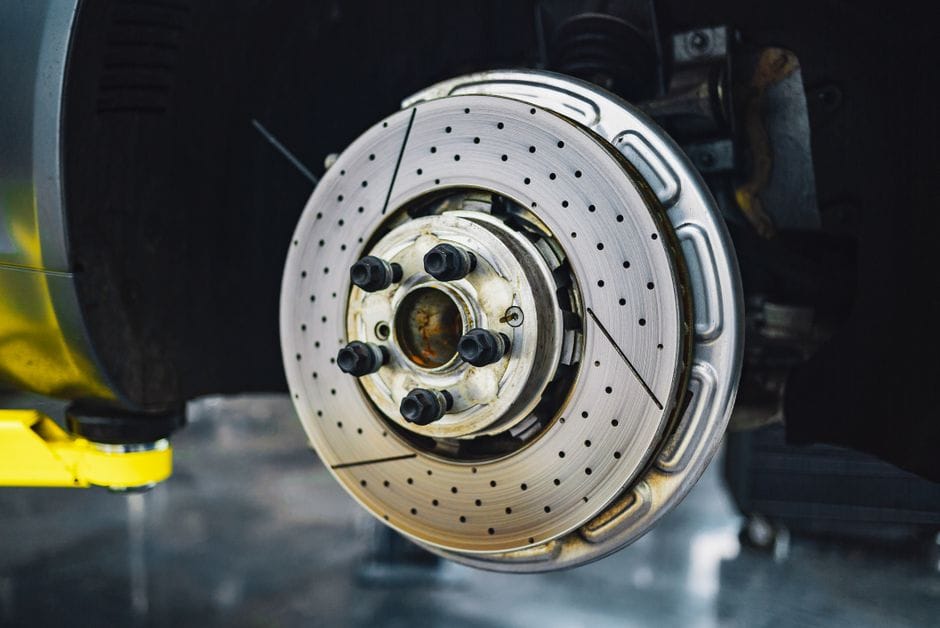
Typical Mileage Range: 30,000 to 70,000 Miles
Most manufacturers rate brake rotors to last between 30,000 and 70,000 miles. That is a wide window because driving style and vehicle weight shift the number more than any other variable. A commuter who does mostly highway miles in a light sedan will see the high end of that range. A delivery driver stopping constantly in city traffic may need rotors at 30,000 miles or sooner.
The published service life assumes you replace brake pads on schedule. Rotors wear in proportion to pad friction, so a worn pad that is not replaced will cut rotor life short. Some premium rotors carry a longer service expectation, but no rotor has a guaranteed mileage. If you are tracking your own service intervals, note the mileage at each pad change. That gives you a baseline for how long your specific brake rotors last on your specific car.
Why Front Rotors Wear Faster Than Rear Rotors
Front rotors consistently wear out faster than rear rotors, usually at a ratio of roughly 2 to 1. The reason is physics: braking transfers weight to the front axle, which increases the grip available to the front tires. The front brakes must then do more of the stopping work, so they generate more heat and friction.
Most vehicles also have larger front rotors and calipers for exactly this reason. On a typical sedan, front rotors may need replacement at 40,000 miles while rear rotors last 70,000 miles or more. If you replace only the front rotors at a pad change, that is normal. If the rears wear at the same rate, it may indicate a stuck caliper or a problem with the brake proportioning valve.
Comparing Rotor Lifespan to Brake Pad Lifespan (30,000–50,000 miles)
Brake pads typically last between 30,000 and 50,000 miles, which means most cars go through two sets of pads for every set of rotors. That is why the common advice is to replace rotors every other pad change. However, this depends on rotor thickness. If the rotor still measures above the minimum spec at the second pad change, you can often keep it.
Cheaper pads tend to be more abrasive and will wear rotors faster. If you choose performance-oriented pads, check whether they are ceramic or metallic, because the friction compound directly affects rotor wear. For guidance on matching pads to your driving needs, see our best brake pads for performance guide. If you drive a truck, our best brake pads for Ford F-150 article covers heavy-duty options that are gentler on rotors.
7 Factors That Determine How Long Your Rotors Will Actually Last
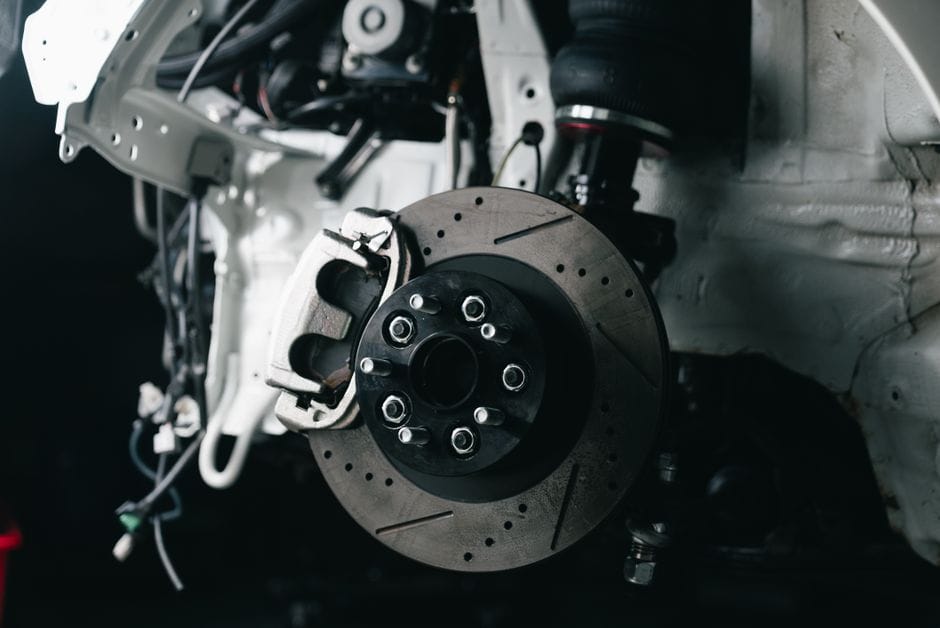
No single number tells you when rotors will fail. The lifespan depends on how you drive, what you carry, and what parts you bolt on. Here are the seven factors that matter most, ranked roughly by how much they affect wear.
Driving Style: Aggressive Braking vs. Highway Cruising
Driving Style: Details
Your driving style is the single biggest variable. Hard stops from highway speed generate intense heat, and that heat cycles the rotor metal repeatedly. Each cycle causes minor expansion and contraction, which leads to surface cracking and thickness variation over time.
Stop-and-go city driving is harder on rotors than highway cruising. Every red light means a heat cycle. Highway drivers who use gentle, progressive braking can often get 70,000 miles from a set. Aggressive drivers who brake late and hard may see rotors warp or develop hot spots in half that time.
The math is simple: fewer hard stops equals longer rotor life. If you habitually brake hard, you are paying for it in rotor wear.
Vehicle Weight and Towing Load
Heavier vehicles demand more from their brakes. A 5,000-pound SUV needs more stopping force than a 3,000-pound sedan, so its rotors run hotter and wear faster. The same applies to towing.
If you regularly tow a trailer or haul heavy loads, your rotors work harder on every stop. The extra mass increases thermal load, which accelerates wear and increases the risk of rotor warping. Trucks and SUVs designed for towing typically ship with larger, vented rotors to handle this, but the lifespan still drops when you actually use the vehicle for heavy work.
For a truck used primarily for commuting, rotors may last 60,000 miles. The same truck towing a 5,000-pound trailer weekly may need rotors at 30,000 miles.
Rotor Material: Cast Iron vs. Carbon-Ceramic
Rotor Material: Details
Rotor material is the second major factor. Cast iron is the standard for most vehicles. It is cheap, durable, and handles heat reasonably well. But it is heavy and prone to rust on the friction surface when the vehicle sits.
Carbon-ceramic rotors are a different category entirely. They resist heat fade far better than iron, weigh less, and produce less brake dust. They also last significantly longer. Manufacturers rate carbon-ceramic rotors for the life of the vehicle in many cases, which can mean 100,000 miles or more.
The tradeoff is cost. Carbon-ceramic rotors cost several times more than cast iron. They also require specific pad compounds. Installing the wrong pads on carbon-ceramic rotors can ruin them quickly. For most drivers, cast iron makes more economic sense. For track use or high-performance street driving, carbon-ceramic may be worth the premium.
Rotor Design: Vented vs. Solid vs. Drilled vs. Slotted
Rotor Design: Details
Rotor design affects how well the rotor sheds heat. Vented rotors have a hollow channel between two friction surfaces. Air passes through this channel as the wheel spins, pulling heat away. Most front rotors on modern vehicles are vented. Solid rotors have no channel and are common on rear axles where braking demand is lower.
Drilled rotors have holes through the friction surface. The holes help release gas and water that build up between pad and rotor, and they look aggressive. But drilling weakens the rotor structure. Under heavy use, drilled rotors are more prone to cracking around the holes. For daily driving, they offer little benefit over plain rotors.
Slotted rotors have machined grooves that wipe the pad surface clean. They help with pad bite and gas release, but they also wear pads faster. Slotted rotors are common on performance vehicles and track cars.
For longevity, plain vented rotors are the best choice. Drilled and slotted designs trade some durability for performance characteristics most daily drivers never need.
Climate and Road Conditions (Salt, Moisture, Hills)
Your local climate affects rotor life in ways you may not expect. In northern states where roads are salted in winter, rotors develop surface rust quickly. The rust itself is cosmetic, but the salt accelerates the formation of rust scale on the rotor edges and hub, which can cause uneven pad contact and vibration.
Moisture is another factor. Vehicles parked outside in humid climates develop surface rust overnight. The first few stops each morning scrub the rust off the friction surface, which adds minor wear. Over years, this adds up.
Mountain driving is the hardest on rotors. Long descents require sustained braking, which builds constant heat. If you drive in the mountains regularly, expect shorter rotor life than flatland drivers. Engine braking on descents can reduce the load on your rotors significantly.
Pad Material Compatibility (Ceramic vs. Semi-Metallic)
Your brake pads are the other half of the friction pair, and their compound directly affects rotor wear. Semi-metallic pads contain metal fibers that bite hard and handle heat well. They also wear rotors faster because the metal particles act like sandpaper on the iron surface.
Ceramic pads use ceramic fibers and copper. They produce less dust, run quieter, and are gentler on rotors. The tradeoff is that ceramic pads may not perform as well under extreme heat as semi-metallics.
For daily driving, ceramic pads are the better choice for rotor longevity. If you drive hard or tow, semi-metallic pads offer better stopping power but will shorten rotor life. Match the pad to your driving, not to the cheapest option on the shelf.
Rotor Quality and Manufacturing Tolerances
Not all rotors are equal. Cheap rotors from no-name brands may have inconsistent metal density, poor machining, or excessive runout. Runout is the side-to-side wobble of the rotor as it spins. High runout causes the pads to push the rotor aside on every revolution, which creates thickness variation and pedal pulsation.
Quality rotors are machined to tight tolerances and use consistent metallurgy. They cost more, but they last longer and are less likely to cause vibration issues. If you are replacing rotors, paying a bit more for a reputable brand is usually worth it.
Also, consider the brake grease and shim setup when installing new rotors. Proper lubrication on the caliper slide pins and pad contact points prevents uneven wear. For details, see our brake grease application guide and our brake pad shim guide. Both cover steps that protect your new rotors from premature failure.
How to Tell If Your Rotors Are Worn Out: Visual and Physical Signs
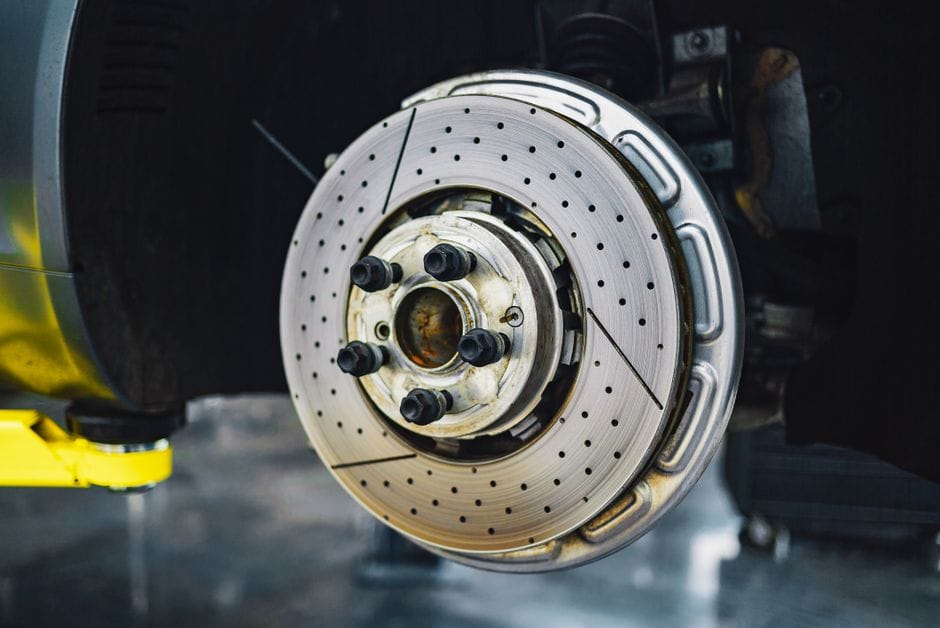
You do not need a mechanic to spot most rotor problems. A flashlight, a jack, and a few minutes are enough for a basic check. But knowing what you are looking at matters more than looking. A shiny rotor is not necessarily healthy, and a dark one is not always worn. Here is how to read what your rotors are telling you.
Measuring Rotor Thickness with a Micrometer (Minimum Discard Spec)
The only number that settles the “should I replace these?” question is the minimum thickness specification. Every rotor has a minimum discard spec stamped on the hub or the edge of the friction surface. It is usually expressed in millimeters, like “MIN TH 22.4 MM.” If your rotor measures at or below that number, replacement is mandatory — resurfacing cannot save it.
You need a micrometer or a caliper, not a ruler. Measure at the thinnest point you can find, typically near the outer edge where the pad does not fully contact. Take readings at several spots around the rotor. Brake rotors wear unevenly, so a single reading can fool you. If the thinnest reading is below spec, the rotor is done. If it is close, factor in how much material the next brake pad change will remove.
Where to find the spec
The minimum thickness is cast into the rotor itself, usually on the hat or the bell section. If you cannot read it, check the manufacturer’s service manual for your exact make and model. Do not guess — [VERIFY: minimum rotor thickness spec for common 2020-2025 sedan models] if you are writing about a specific vehicle.
Grooves, Scoring, and Heat Cracks: What’s Normal vs. Dangerous
Light scoring is normal. Every rotor develops fine concentric lines as the pad wears. Deep grooves are different. If you can catch a fingernail in a groove, the friction surface is compromised. Grooves reduce pad contact area, which means less stopping power and faster pad wear.
Heat cracks are the more serious issue. Small hairline cracks at the edge of the friction surface are common on hard-driven rotors and are often cosmetic. Radial cracks that extend across the friction surface toward the hub are structural. They can propagate and cause the rotor to fail. If you see a crack that spans more than a third of the friction width, replace the rotor immediately. Do not wait for a warning light — there is no sensor for a cracked rotor.
Runout and Lateral Runout: When Warping Is Real
Runout and Lateral Runout: Details
“Warped rotors” is a catch-all term, but true warping is rare. What most people call warping is actually lateral runout — the rotor wobbling side to side as it spins. Even a few thousandths of an inch of runout causes the pads to push back, creating thickness variation. That variation is what you feel as brake pedal pulsation.
You can check runout with a dial indicator mounted to a fixed point while you spin the rotor. The spec is typically 0.002 to 0.004 inches [VERIFY: typical lateral runout specification for passenger car brake rotors]. If runout exceeds spec, the rotor may be salvageable by resurfacing — but only if it still has enough thickness. If it is below minimum thickness, resurfacing is not an option.
Pulsation in the Brake Pedal: What It Actually Means
Brake pedal pulsation feels like a rhythmic thumping or vibration through the pedal when you brake. It usually means the rotor has thickness variation — some spots are thinner than others. Each time the pads pass over a thin spot, the pedal pulses.
Pulsation is almost always a rotor problem, not a pad problem. New pads on a worn rotor will still pulsate because the rotor surface is uneven. The fix is either resurfacing or replacement, depending on remaining thickness. If the pulsation is severe, replacement is the safer call. A rotor with significant thickness variation has less material to absorb heat and is more likely to crack.
Squealing, Grinding, and Vibration: Audio Cues
Squealing, Grinding, and Vibration: Details
Sound is a reliable early warning system. A high-pitched squeal when braking often means the wear indicators on your brake pads are contacting the rotor. That is a pad problem, not a rotor problem — but if you ignore it, the metal backing plate will eventually grind into the rotor, ruining it.
A grinding noise means metal-on-metal contact. The rotor friction surface is already damaged and will need replacement. A low-frequency vibration felt through the steering wheel or the floorboard, rather than the pedal, can indicate runout or a stuck caliper. If one front rotor is hot after a drive while the other is cool, the caliper is dragging. That heat will glaze the rotor and accelerate wear.
Signs that mean replace now
- Rotor thickness at or below minimum discard spec
- Radial heat cracks spanning the friction surface
- Deep grooves you can catch a fingernail in
- Grinding noise with visible metal scoring
- Severe brake pedal pulsation that resurfacing cannot fix
Signs that mean inspect further
- Light surface scoring and fine concentric lines
- Hairline cracks at the outer edge only
- Minor runout within factory tolerance
- Squealing from pad wear indicators (replace pads, not rotors)
- Rust on the hub or hat — cosmetic, not structural
If you catch a rotor problem early, you can often replace just the brake pads and keep the rotors. But if the rotor is below minimum thickness or cracked, do not resurface it — replace it. And when you do the job, check the brake pad sensor reset procedure if your vehicle has electronic wear sensors, and confirm your brake lights still work properly afterward. Both are quick checks that prevent bigger problems down the road.
Rotor Replacement vs. Resurfacing: Which Is the Right Call?
When your rotors show wear, you have two paths: machine them smooth again or swap in new ones. The right choice depends on rotor thickness, the damage pattern, and your budget. Here is how to decide without guessing.
When Resurfacing (Machining) Makes Sense: Thickness Remaining
When Resurfacing (Machining) Makes Sense: Details
Resurfacing, also called machining or turning, removes a thin layer from the friction surface to eliminate grooves, glazing, and minor runout. Shop lathes cut between 0.010 and 0.020 inches per side, so the rotor must start with enough material to stay above the minimum discard spec after the cut.
[VERIFY: minimum discard thickness formula — need typical OEM spec range for common vehicles, e.g., 20-24mm new vs 18-22mm discard]
Resurfacing works when the rotor still has solid thickness, the surface damage is uniform, and there are no cracks. It is also the right call for a new set of pads on a rotor that is only slightly scored. Many manufacturers state that a rotor can be machined once or twice in its service life, provided the final thickness stays above spec. Ask the shop to measure with a micrometer and show you the numbers before they cut.
When Replacement Is Mandatory: Below Discard Spec, Cracks, or Excessive Scoring
Some rotors should never see a cutting bit. If the measured thickness is already at or below the minimum discard spec stamped on the rotor hat, resurfacing is dangerous — you would remove material that keeps the rotor structurally sound. Heat cracks that run radially across the friction face are another hard stop. So are deep grooves that would require cutting past the discard spec to clean up.
Excessive scoring from worn-out brake pads, where the friction surface looks like a scratched record, also points to replacement. Once the metal is that damaged, machining leaves a thin rotor with compromised heat capacity. Replace rotors in these cases without hesitation. A rotor that fails from thinning or cracking can cause a sudden loss of braking force.
Resurfacing Pros
- Costs less than new rotors — typically 40–60% of replacement price
- Keeps the original hub and hat, preserving wheel fitment
- Removes minor runout and glazing for a smooth pedal feel
Resurfacing Cons
- Reduces rotor thickness and heat capacity permanently
- Only viable once or twice before hitting discard spec
- Does not fix cracks, deep scoring, or structural damage
Cost Comparison: Resurfacing vs. New Rotors
Cost Comparison: Details
Resurfacing (per rotor): $15–$25 at a shop, or free if you have access to a lathe. [VERIFY: current average resurfacing labor rate at chain shops]
New budget rotor (each): $30–$60 for most passenger cars. [VERIFY: current average aftermarket rotor price for common sedans]
New premium rotor (each): $80–$150 for coated or drilled-and-slotted units. [VERIFY: current price range for coated rotors from major brands]
At those numbers, resurfacing saves real money on a single job. But the math flips if you plan to keep the car past another pad change. A rotor that gets machined now will likely need replacement at the next pad swap anyway, so you pay the resurfacing fee and then the full rotor price later. New rotors now skip that intermediate cost.
The Case for Replacing Rotors Every Time You Change Pads
Many shops push a full brake job — new pads and rotors together — and there is a mechanical reason beyond profit. New brake pads need a smooth, flat surface to bed in against. A worn rotor with taper or grooves will not mate evenly with fresh friction material, which can cause vibration and reduced stopping power during the bedding-in process.
Replacing rotors with every pad change also guarantees you start at full rotor thickness, which means maximum heat capacity and the longest possible service life. The extra cost is modest — often $60–$120 more per axle — and it eliminates the risk of a machined rotor failing prematurely. If you drive a performance car or tow heavy loads, this is the safer choice. For a commuter sedan where the rotor still measures well above discard spec, resurfacing once is a reasonable economy.
The final factor is labor. If you are paying a shop, the labor to resurface is the same as the labor to replace, so the only difference is parts cost. If you are doing the job yourself, replacing rotors is actually easier than coordinating a trip to the machine shop. Pair new rotors with quality brake pads, and follow a proper bedding procedure. For step-by-step guidance on the pad side, see our guide on how to change brake pads Chevy Silverado. And if you want more stopping authority than stock, our best brake upgrade for street article covers rotor and caliper options that pair well with a fresh set.
Rotor Material and Design Comparison: Which Type Lasts Longest?
Material choice and physical design determine how many miles you can expect from your brake rotors. The chemistry of the iron or composite affects heat tolerance, while the geometry affects how quickly that heat escapes. Both matter more than driving style in the long run.
Cast Iron Rotors: The Standard, Affordable Choice
Cast Iron Rotors: Details
Cast iron rotors dominate the market because they balance cost and performance. Most OEM and aftermarket rotors use gray cast iron, which handles heat well and wears predictably. These brake rotors typically last 30,000 to 60,000 miles, depending on pad material and driving conditions.
The main weakness of cast iron rotors is corrosion. Rust forms on the friction surface when the car sits for days, especially in humid climates. This surface rust usually wears off after a few stops, but deep pitting can shorten rotor life. Coated rotors, like those with zinc or Geomet plating, resist this corrosion better. The coating adds $10–$20 per rotor but can extend service life noticeably.
Cast iron rotors also suffer from heat checking under severe use. Repeated hard braking creates tiny cracks on the surface. These are cosmetic at first, but they can grow into structural cracks that require replacement. For normal street driving, this is rarely a problem.
Carbon-Ceramic Rotors: Extreme Longevity at a Premium Price
Carbon-Ceramic Rotors: Details
Carbon-ceramic rotors are a different category entirely. These brake rotors use carbon fibers embedded in a ceramic matrix, which gives them remarkable heat resistance and durability. They are standard on high-end performance cars like Porsche, Ferrari, and Corvette models.
The lifespan advantage is real. Carbon-ceramic rotors can last 100,000 miles or more under normal use, and they resist the thermal fatigue that kills cast iron. They also produce less brake dust and stay cleaner. The trade-off is cost: a full set can run $5,000–$15,000 depending on the vehicle. [VERIFY: current market price range for a full carbon-ceramic rotor set on a mainstream performance car]
There are also practical downsides. Carbon-ceramic rotors can crack if struck by a curb or rock, and they are not recommended for track use on some models because of heat-related wear. They also require specific brake pads; using the wrong compound can damage the rotor surface. For most readers, the cost far outweighs the lifespan benefit.
Drilled vs. Slotted vs. Vented: Design Trade-offs for Lifespan
Drilled vs. Slotted vs. Vented: Details
The design of the rotor surface affects both performance and how long the part lasts.
Drilled rotors have holes through the friction surface. These holes help release gas and water, which improves wet braking and initial bite. But the holes create stress points where cracks can start. Under hard use, drilled rotors are more likely to develop radial cracks than solid rotors. They also wear pads faster because the hole edges act like cutting tools.
Slotted rotors have machined grooves instead of holes. The slots wipe the pad surface clean and help vent gas. They are more durable than drilled rotors because there are no through-holes to weaken the structure. Slotted rotors last longer under track use but still wear pads quicker than a blank rotor.
Vented rotors have internal vanes between the two friction surfaces. This is a design feature, not a surface treatment. The vanes pull air through the rotor, which cools it faster. Vented rotors are standard on front axles of most modern cars because front brakes handle up to 70% of stopping force. Solid rotors, without vanes, are usually found on rear axles where heat loads are lower.
For maximum lifespan, a blank, vented rotor is the best choice. No holes or slots means no stress risers, and the internal vanes keep temperatures manageable. If you want extra bite for track days, slotted rotors are the better compromise. For a detailed look at track-focused options, see our best brake upgrade for track guide, and for keeping temperatures down, read our brake cooling guide for track.
Decision Framework: If You Need [Specific Requirement], Choose [Specific Rotor Type] Because [Specific Reason]
The right rotor depends on your priorities. Here is a practical framework:
– If you need low cost and reliable daily commuting, choose blank cast iron rotors because they deliver the best price-to-lifespan ratio and are cheap to replace.
– If you need maximum lifespan for a street car, choose coated blank cast iron rotors because the corrosion resistance prevents pitting that shortens rotor life.
– If you need track performance without frequent replacement, choose slotted rotors because they manage heat and pad debris without the crack risk of drilled holes.
– If you need extreme longevity and drive a car that came with them, choose carbon-ceramic rotors because they can outlast the car itself — but only if the upfront cost is acceptable.
– If you need to avoid drilled rotors, do so because the hole pattern is a known crack initiation point under hard braking.
| Rotor Type | Typical Lifespan | Heat Tolerance | Cost Per Rotor | Best Use Case |
|---|---|---|---|---|
| Blank cast iron | 30,000–60,000 miles | Good for street | $30–$80 | Daily commuters, budget builds |
| Coated cast iron | 40,000–70,000 miles | Good for street | $40–$100 | Rust-prone climates, long-term ownership |
| Drilled | 20,000–40,000 miles | Moderate; crack risk | $50–$150 | Street show cars, light performance |
| Slotted | 30,000–50,000 miles | High | $60–$180 | Track days, heavy towing |
| Vented (internal vanes) | 30,000–60,000 miles | High | $40–$120 | Front axles, performance street |
| Carbon-ceramic | 100,000+ miles | Very high | $800–$2,500+ | Exotic cars, long-term luxury |
The lifespan figures above assume normal street driving with quality pads. Aggressive driving, heavy loads, or track use will shorten these numbers, regardless of material. If you are deciding between rotors for a specific vehicle, check the manufacturer’s minimum thickness spec and pair the rotor with a pad compound that matches your driving style.
How to Extend the Life of Your Brake Rotors: Practical Maintenance Tips
You can stretch the rotor lifespan on most cars well past the average figures listed in the previous section. The difference usually comes down to a few specific habits and installation steps. Here is what actually moves the needle, based on published service procedures and manufacturer guidance.
Bedding In New Rotors and Pads Correctly
Bedding in is the single most important step for new brake rotors. It transfers a thin, even layer of pad material onto the friction surface. Skip it, and you get uneven deposits that cause pedal pulsation and vibration — two of the fastest ways to ruin a fresh set of rotors.
The process is straightforward. Find an empty road, accelerate to about 40–50 mph, and brake firmly down to 5–10 mph without coming to a full stop. Repeat this 8–10 times. The rotors will get hot, which is expected. After the last cycle, drive for several minutes without braking to let them cool. Do not sit at a stoplight with your foot on the brake during this cooling phase, because it can imprint pad material into one spot.
If you install new brake pads on old rotors, you still need to bed them in. The same procedure applies, but inspect the rotor surface first for deep grooves or scoring. If the old rotors are too rough, they will chew through the new pads quickly, and no amount of bedding in will fix that.
Avoiding Heat Soak: Engine Braking and Downshifting
Avoiding Heat Soak: Details
Heat is the primary enemy of brake rotors. Every hard stop generates friction heat, and when rotors get hot enough, they can warp or develop cracks. You can reduce the heat load without changing your driving style much.
Engine braking is the easiest tool. On long downhill grades, downshift to a lower gear and let the engine hold your speed instead of riding the brake pedal. This keeps the brake rotors cooler and saves the pads from unnecessary wear. Automatic transmissions with manual shift modes or paddle shifters let you do this too.
Anticipate stops instead of braking at the last second. Coasting to a slower speed before applying the brakes means less heat per stop. This is not about driving slowly — it is about spreading the braking energy over a longer distance. The less heat you put into the rotors, the longer they last.
Regular Inspection Intervals and Torque Checks
Brake rotors wear gradually, and catching problems early prevents premature failure. A visual inspection every oil change is a solid habit. Look for deep scoring, blue discoloration from overheating, or cracks near the edges. Any of these signs means the rotors are stressed and may need replacement soon.
Torque checks matter more than most DIYers realize. When you install wheels after a brake job, use a torque wrench and follow the manufacturer’s specification. Over-tightened lug nuts can warp the rotor flange, causing runout that feels like a warped rotor. Under-tightened lug nuts let the wheel wobble, which also damages the rotor. [VERIFY: torque specification for common vehicle lug nuts — provide a range for passenger cars]
You should also check the rotor thickness with a micrometer if you suspect wear. Compare the measurement to the minimum thickness stamped on the rotor hat. If the rotors are close to that minimum, replacement is the safer call than resurfacing.
The Role of Brake Grease and Shim Installation in Even Wear
Uneven pad wear is a common cause of reduced rotor lifespan. When one pad wears faster than the other, the rotor surface wears unevenly, and you lose effective friction area. Brake grease and pad shims directly address this.
Brake grease goes on the back of the brake pads and on the caliper contact points. It prevents the pads from sticking to the caliper, so they retract cleanly when you release the pedal. Without proper lubrication, pads can drag on the rotors, generating constant heat and accelerating wear on both components. Follow the brake grease application guide to see exactly where the lubricant should go — and where it should not, because grease on the friction surface ruins the pads.
Brake pad shims are thin metal or rubber layers that sit between the pad backing plate and the caliper piston. They serve two purposes: they reduce noise, and they promote even pressure distribution across the pad surface. If the pressure is uneven, one edge of the pad wears faster, which transfers that uneven wear to the rotor. Installing new shims with every pad change is cheap insurance. The brake pad shim guide explains which types work with your caliper design.
A final note on hardware: the caliper slide pins need fresh grease at every brake job. If these pins seize, the caliper cannot move freely, and the inner pad drags on the rotor constantly. This single issue destroys both pads and rotors faster than aggressive driving. It is a 10-minute job that protects your investment for thousands of miles.
Honest Limitations: What Brake Rotors Cannot Do
Brake rotors are the workhorse of your braking system, but they are not a cure-all. Understanding their limits prevents you from expecting a new set of rotors to solve problems they were never designed to address. If a brake system issue persists after a rotor replacement, the cause usually lives in another component.
Rotors Cannot Compensate for Worn Brake Fluid
Brake fluid transmits the force from your pedal to the calipers. Over time, it absorbs moisture, which lowers its boiling point. Under hard braking, that moisture turns to vapor, creating compressible air pockets in the lines. The result is a soft, spongy pedal that travels too far before engaging the brakes.
New rotors do nothing to fix this. The hydraulic system still cannot build enough pressure to clamp the pads effectively. If your pedal feels mushy, the fix is a brake fluid flush, not a rotor swap. Check your owner’s manual for the recommended interval, typically every two to three years. [VERIFY: average brake fluid replacement interval recommended by vehicle manufacturers]
Rotors Cannot Fix Caliper Malfunctions
A seized caliper piston or a stuck slide pin causes one pad to drag against the rotor constantly. This generates heat, warps the rotor surface, and destroys the pads prematurely. If you replace the rotors without addressing the caliper, the new parts will suffer the same fate within a few thousand miles.
Symptoms of a caliper problem include the vehicle pulling to one side during braking, uneven pad wear, and a burning smell after driving. If you notice these signs, inspect the calipers and slide pins before spending money on rotors. A properly functioning caliper is a prerequisite for rotor longevity.
Rotors Cannot Overcome Poor Pad Material Selection
Brake pads and rotors wear together as a friction pair. The pad material determines how aggressively the rotor surface is abraded. Low-quality organic pads can shed material unevenly, leaving deposits on the rotor face that cause pedal pulsation. Aggressive semi-metallic pads, while great for heavy-duty use, wear rotors faster than ceramic alternatives.
If you install premium rotors but pair them with mismatched pads, you will see accelerated rotor wear and reduced braking performance. The pad material must match your driving style and the rotor’s intended use. Ceramic pads are the best match for daily-driven vehicles because they are gentle on rotors and produce minimal dust.
Rotors Will Not Last Forever: The Inevitable Wear Cycle
Every braking event removes a microscopic layer of metal from the rotor surface. This is by design — the friction that stops your car is the same friction that wears the parts down. No material science breakthrough eliminates this fundamental trade-off.
The minimum thickness spec stamped on the rotor hub is the hard limit. Once the rotor wears below that number, it cannot dissipate heat safely and may crack under stress. You can measure this with a micrometer or have a shop check it during tire rotation. When the rotor hits minimum thickness, replacement is the only option — resurfacing would remove too much metal and leave the rotor dangerously thin.
Bottom Line on Rotor Limitations
Rotors stop the vehicle by converting kinetic energy into heat through friction. They cannot regulate hydraulic pressure, control caliper movement, or compensate for incompatible pad compounds. If you address brake fluid, calipers, and pads as a complete system, your rotors will deliver their full service life. If you treat them as an isolated component, you will be replacing them again sooner than expected.
If you are planning a full brake system refresh, the brake system upgrade guide walks through component selection in the correct order. And if your parking brake uses a separate drum-in-hat design, the emergency brake cable replacement guide covers that system, because a dragging parking brake also accelerates rear rotor wear.
Frequently Asked Questions About Brake Rotor Lifespan
These are the questions car owners ask most often when they start researching rotor wear. The answers here tie back to the wear factors and replacement signs covered in the earlier sections.
Can brake rotors last 100,000 miles?
Yes, some rotors can reach 100,000 miles, but it is not the norm. The rotors that make it that far share a few traits: they are made from high-carbon or coated iron, they are paired with ceramic brake pads, and the vehicle spends most of its time on highways rather than stop-and-go city streets. A 100,000-mile rotor also requires that the vehicle never runs with worn pads down to the metal backing plate, which scores the rotor face and ruins it quickly.
For most drivers, the realistic window is 30,000 to 70,000 miles before a rotor either wears below minimum thickness or develops a pulsation. If you are chasing 100,000 miles, focus on pad quality and driving habits more than rotor brand. The rotor does not wear itself out; the pad and driving style determine how long brake rotors last.
Do ceramic brake pads make rotors last longer?
Generally, yes. Ceramic brake pads are formulated with less abrasive material than semi-metallic pads, so they remove less metal from the rotor surface with each stop. They also transfer heat more evenly, which reduces the chance of hot spots that lead to warping.
The trade-off is that ceramic pads cost more and can feel less aggressive when cold. For daily driving, that is a fair exchange for extended rotor life. If you want maximum rotor longevity, pair ceramic pads with quality rotors and avoid heavy braking whenever you can. The best brake pads for performance page covers specific ceramic compounds that are easy on rotors while still offering strong bite.
Is it safe to drive with slightly warped rotors?
A slight pedal pulsation is not an immediate safety emergency, but it is a warning you should act on. Warped rotors reduce braking contact area, which means longer stopping distances and uneven force on the wheels. In a panic stop, that inconsistency can make the vehicle pull to one side.
What you should not do is ignore the pulsation for thousands of miles. The vibration stresses the caliper slides, wheel bearings, and suspension bushings. Those parts are more expensive to replace than the rotor itself. If the pedal shakes but the vehicle still stops in a straight line, you can drive to a shop at moderate speed. If the vibration is severe or the steering wheel shakes hard, have the vehicle towed.
How much does it cost to replace all four rotors?
The cost depends heavily on the vehicle. For a compact car with standard iron rotors, parts run roughly [VERIFY: current average price for a set of four OEM-equivalent rotors for a compact car] and labor adds another [VERIFY: average labor cost for four-rotor replacement at an independent shop]. For a heavy truck or performance vehicle with drilled and slotted rotors, the total can be two to three times higher.
DIY installation cuts the labor cost entirely, but you need a jack, stands, and the right tools. If you go that route, budget for new hardware clips and anti-seize compound. Dealership pricing runs higher than independent shops for the same parts. Always get a written estimate that separates parts from labor.
Do I need to replace rotors every time I change pads?
No, but you need to measure them every time. A rotor can typically survive two pad changes if it has not worn below minimum thickness and the surface is smooth. The shop should measure with a micrometer, not just eyeball the surface.
If the rotor is within spec and shows no deep grooves or cracks, you can install new pads on the existing rotors. If the rotors are borderline, resurfacing them once can restore a flat surface. Many shops now skip resurfacing because replacement rotors are affordable, but that is an economic choice, not a mechanical requirement. When you do replace everything, a brake conversion kit guide can help if you are considering upgraded rotors or calipers.
Quick Rule of Thumb
If you are on your second pad change and the rotors have never been measured, replace them. The cost of rotors is far lower than the cost of a brake failure caused by a rotor that cracked at minimum thickness.
Frequently Asked Questions
Can brake rotors last 100,000 miles?
[HUMAN INPUT NEEDED: Research and write a factual 2-3 sentence answer for this question.]
Do ceramic brake pads make rotors last longer?
[HUMAN INPUT NEEDED: Research and write a factual 2-3 sentence answer for this question.]
Is it safe to drive with slightly warped rotors?
[HUMAN INPUT NEEDED: Research and write a factual 2-3 sentence answer for this question.]
How much does it cost to replace all four rotors?
[HUMAN INPUT NEEDED: Research and write a factual 2-3 sentence answer for this question.]
Do I need to replace rotors every time I change pads?
[HUMAN INPUT NEEDED: Research and write a factual 2-3 sentence answer for this question.]
Final Verdict: How Long Do Brake Rotors Last?
Brake rotors are the friction surfaces your brake pads clamp onto to slow your vehicle. Their lifespan is not a fixed number—it’s a function of material composition, driving environment, and maintenance habits. The most important attributes to remember: material type (cast iron vs. carbon-ceramic), minimum thickness specification (the wear limit stamped on the rotor), and lateral runout (warpage tolerance). These three attributes determine when your rotors are truly done, regardless of mileage.
For the vast majority of drivers, our top recommendation is replacing rotors with OEM-equivalent cast iron units at the 50,000–70,000 mile mark, or when thickness measurement falls below the minimum spec—whichever comes first. We recommend this because cast iron rotors offer the best balance of thermal capacity, cost per mile, and predictable wear characteristics. They dissipate heat effectively, cost $40–$80 per rotor, and their wear is measurable with a simple caliper, giving you objective data instead of guesswork.
Use this decision framework to match your driving profile to the right replacement strategy:
If you need maximum durability for daily commuting: choose OEM cast iron rotors because their metallurgy is tuned to your vehicle’s caliper pressure and pad compound, giving you 50,000–70,000 miles of service with minimal noise.
If you need performance under heavy braking or track use: choose drilled or slotted rotors because cross-drilling improves gas evacuation and heat dissipation, reducing brake fade during repeated hard stops.
If you need longevity on a luxury or high-performance vehicle: choose carbon-ceramic rotors because their hardness resists wear dramatically—they can last 100,000+ miles—but only if your budget accommodates $3,000+ per rotor replacement.
If you need to maximize cost savings on an older vehicle: choose aftermarket blank rotors because they meet or exceed OEM specifications at 30–50% lower cost, provided you verify the minimum thickness spec matches your calipers.
Honest limitation: the top pick—OEM cast iron rotors—cannot eliminate the root cause of premature failure. If you have a sticking caliper, a worn wheel bearing, or you habitually brake late and hard, even the best rotors will warp or crack early. No rotor material compensates for a mechanical fault or aggressive driving style. If your vehicle pulls to one side during braking, fix the caliper before spending money on rotors, or you’ll be replacing them again in 15,000 miles.
Your next step: grab a caliper, measure your current rotor thickness at the thinnest point, and compare it to the minimum spec cast into the rotor hat. If you’re within 1.5mm of that number, replacement is due now. If you have a pulse, a jack, and a lug wrench, this is a weekend job that will save you $200–$400 in labor. If you’re not comfortable with the work, order the correct rotors for your vehicle’s VIN and have a trusted shop install them—but insist they measure and record the new rotor thickness so you have a baseline for the next 50,000 miles.
You might also like: emergency brake problems, best drilled and slotted rotors, brake rotor buying guide
![How Much Does Fuel Filter Replacement Cost? [2025 Prices]](https://vehiclebar.com/wp-content/uploads/2026/01/fuel4-768x768.webp)